Showing posts with label Google. Show all posts

February 04, 2014

Google Chrome will now detect and fix browser settings 'hijack'

Posted by Unknown
Hijacking of browser settings tops the list of user complaints made to search engine Google as cyber criminals change them using malicious software.

Modification of the settings is done without users' knowledge to generally force hits on a particular website, increasing its advertising revenue.


"So, you're trying to download a free screensaver or game or something else you really want. But later you find out that game came bundled with a malicious programme that's trying to hijack your browser settings. You're not the only one having this problem, in fact, it's an issue that's continuing to grow at an alarming rate," Google said on its official blog.

To help keep users browser settings under their control, Google added a 'reset browser settings' button to Chrome's settings page in October last year, it added.

"Despite this, settings hijacking remains our number one user complaint," the tech giant said.

To make sure the reset option reaches everyone who might need it, Google added that Chrome will be prompting Windows users whose settings appear to have been changed if they like to restore their browser settings back to factory default.

"If you've been affected by settings hijacking and would like to restore your settings, just click 'Reset' on the prompt below when it appears," Google VP Engineering Linus Upson said.

"Some hijackers are especially pernicious and have left behind processes that are meant to undermine user control of settings, so you may find that you're hijacked again after a short period of time," Upson said.

In such a situation, users can find additional help uninstalling such programmes in the Chrome help forum, he added.

"Even if you don't see the prompt, you can always restore Chrome to a fresh state by clicking the reset button in your Chrome settings," Upson said.

Also Read : Clash Of Clans Cracked Apk

Read More

February 03, 2014

Try Google's New Search Feature As the Crow Flies!

Posted by Unknown
We all know that Google had become part of everyone's life in almost in all the daily activities.In Order to make the life much better,simple and faster. Google is adding new features to it's OneBox Features. The company had recently launched it's new feature named As the Crow Flies!(Yes one more animal joined in Google with panda,penguin.humming bird), to it's OneBox which lets you to know the Distance between the two places.


This feature was released by Google before two days. According Google the measurement is calculated as the crow flies! that works for far-flung locale, Here is what Google said about calculation of distance

This “as the crow flies” distance is a new Google Search feature that works for far-flung locales, beyond what you can drive or walk.

So it will work only for two distance points which are far enough, If they are not then you will get as below


Your query can be in your normal language like distance between Hyderabad and Delhi 
Or How far is between Hyderabad and Delhi.

Read More

January 30, 2014

How to Enable or Disable Google Chat History

Posted by Unknown
If you are using Google account, then you might be aware with Google Chat service. Basically Google allows users to chat with their Google contacts while using the Google email service at a single time. The Google chat is a web based chat system that works pretty good like an instant PC messenger. It does not require any third party plugin, addon or app.

Google chat has some cool options like text chatting, share emoticons, call the user, send files, etc. And like other instant chat rooms software, Google chat also keeps the chat records in your account by default. It automatically records the all chat history. It means your chat partner or anyone else can easily look into your past chat sessions with access.


If you are an only account user and other Google accounts are not connect with your account, then it may not be a problem. But if the email account is shared, then you could be in a great trouble. All in case, if you are using a family or a company account.

Google have two options to enable, disable the chat history. The very first option will allow users to completely disable the chat history. After disabling the chat history, your future chats will not be recorded at all, so that it cannot be accessed or searched by any person after the sessions closes.

Save or Never Save Google Chat History

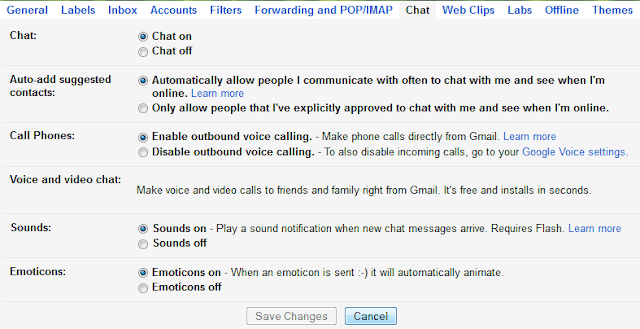
Simply log in to your Gmail account and click on the small Gear Icon located on the top right corner near by your profile photo. Now click on the Settings and switch to Chat tab. Click here to directly visit to Google Chat Settings page.


Here you will see two options, to disable Google chat history, simply select the option Chat offand to enable chat history, just select the Chat on and click Save Changes.

Other Cool Options for Google Chat Settings

Sometimes users only want to block Google chat history of a particular person or want to delete old chat recording histories.

Remove Google Chat History: To look into the previous chat history that has been recorded by Google earlier, simply type in:chat into the search bar of Gmail homepage and hit enter. The entire Google chat history will appear right in front of you with the option to delete them from records.

Turn off Chat Recording: To disable chat recording for a particular contact during chat, click on the More (down arrow icon) located on the top right corner of the chat window and select Go off the record. This option will block chat history for a particular contact, with that user Google chat history will no longer saved neither in your Gmail account nor the chat partner’s account.

Read More

January 12, 2014

What is Google Drive? Getting Started With Google Drive

Posted by Unknown
Google launched its new project called Google Drive .Its new Google's cloud storing service where you can upload and share your Pictures ,Files ,Docs etc with others.


How to get started with Google Drive?

Go to https://drive.google.com/ signup and get started with your Google Cloud storage.You can also download Google Drive to your desktop and right away start sharing your files from desktop.

What is the use of Google Drive?

This product will be very helpful for those who want to store their files safely.Google Drive have applications for Google Chrome Browser and Android.The iOS application will shortly arrive.Google Drive provides you 5GB of free space for storing and you can buy if you want more space.


The best part of Google Drive is that it can support a large number of file extensions.So you can upload ,view ,share any HD videos ,any photoshop file etc.I came to know that Google Drive almost supports files with 30 different extensions.
Features of Google Drive:

Documents are free: Google Drive gives you 5GB storage for free but any docs you create within google drive dont count.

You can upload upto 30 different file extensions: Yes as i already said you can upload files upto 30 different extensions on google drive which many other cloud services dont.

Easy File Sharing: Previously you used to upload files as attachments and mail them to others.But now your job is made simple.You can just upload files to Google Drive and share link with others.

Easy Sharing to Google+: You can share your videos and photos on Google + which are available on your Google Drive. 

Get your old files: Google Drive keeps a copy of every file you edit on Google Drive .So you can revise any copy of your files which is older than 30 days. 

Wide Range of Apps: There are many applications for Google Drive .Just visit Chrome's web store there you will see a lot of applications. 

Work Together: Now you can work together with your co-workers online. You can create new documents and edit old documents. Google drive will also show the name of the person by which the document was edited. All changes on any files will take place instantly. 

Read More

Google+ Keyboard Shortcut Keys-Google Plus Tricks

Posted by Unknown
Google+ which is going to be the next biggest social network has upgraded many features.AfterGoogle plus changed its look I became google+ addict.Google+ is growing day by day and advancing its features.So today I am going to share some google+ keyboard shortcut keys which help you in making most out of Google+.

Google+plus+shortcut+keys

Google+ Keyboard Shortcut Keys:

J = To move to the next stream posted by your circle


k = To move to the previous stream posted by your circle


n = New Comment on current post


p = Previous comment on current post


Space = Scroll Down


Shift + Space = Scroll Up


Enter while selected a stream = Comment box


Ctrl + Space = Scroll Down


* =  *bold*   will become bold


_ = _italics_   will become italic


-  =  -Imran- will become Imran


I hope you liked these Google+ shortcut keys.I will be posting more articles on Google+ Tips and Tricks in my upcoming posts.
Read More

Google May 2012 Page Rank Update

Posted by Unknown
Today there was a Google Page Rank Update-May 2012,finally our blog All Tech Buzz got Page Rank-1.Home Page got Page Rank-1 and not only home page but also almost all the internal pages also ranked 1,2 in this page rank update which is very important for ranking top on Google.It looks like its a minor update and there will be a major update soon.
Page+Rank+1
Check+bulk+page+ranks

What is Google Page Rank?

Google Page Rank is a measure to denote how popular a page,website or blog is.It can be anywhere between 1-10. Greater the rank then greater the popularity of the webpage.Page Rank is not the only criteria to say how popular a website or blog is but it is one of the most important factor which Webmasters and Bloggers look to rank top in Google.I will clear all your doubts regarding Page Rank keep reading......

Some Common Questions Regarding Page Rank:

How Google Measures Page rank?

Google ranks your page on the basis of one important factor i.e Back Links.Back links are the links which link backs from other website to your website.
Though back links are the most important factors for getting a decent page rank,there are many other factors which effect page rank of your blog like page loading speed,content of your page,Incoming and Outgoing links, Internal linking and many other factors of which I have mentioned are major.

How To Increase Your Page Rank?

To increase your blog page rank start building back links and posts quality content.I will be posting some articles in future on how to build back links newbie guide.

When will be the next page rank update?

No one knows answer for this question because there may be a page rank update anytime but mostly it will be in next 2-3 months after this update.

Is Google Page Rank is the only factor to rank top on Google?

No,absolutely not .Page Rank is just one of the 200+ factors that google looks for to rank a page on google.I have seen many blogs having low page rank but ranks top on Google.For example our blog didn't had page rank till yesterday but our blog ranks top for many keywords on google like facebook tricks,increase torrent download speed and many.
Check the below screenshot:
Remove+timeline+search

How often would Google Update Page Ranking?

Google Page Rank is not a constant measure.It changes daily in their computers.But these values are displayed only once in 2-3 months.

I hope even your blog got good page rank if not don't worry start working today for the next page rank update.Share your views in your comments.
Read More

January 02, 2014

Google updates Chrome for Android and iOS, says it reduces data usage by half

Posted by Unknown
chrome-updated-android-ios-635.jpg

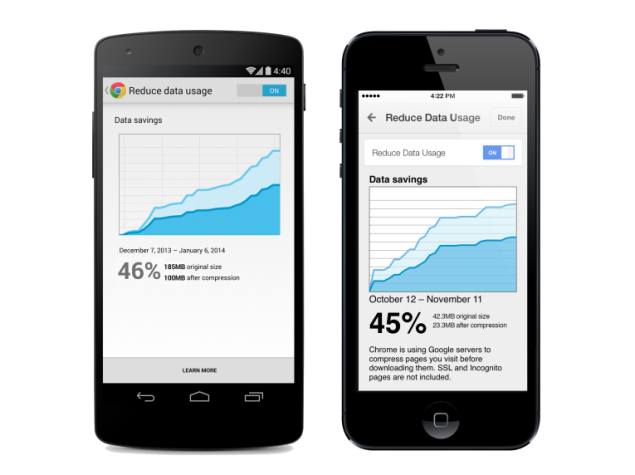
Search engine giant, Google, on Wednesday announced an upgrade for its Chrome apps for Android and iOS, bringing them up to version 32. The new apps feature new tweaks that will allow users to cut their data consumption by as much as 50 percent. Ever since the affordability of smartphones has increased across the rank and file of people around the world, Internet browsing too has shifted from desktops and laptops to mobile phones and tablets.


Google in its Chrome blog post announcing the changes, cited a survey conducted by Pew Internet, which suggests that 20 percent of Americans do most of their online browsing via their mobile phones. The blog post details about the trends in the mobile browsing and how the new tweak will help users.
The company says that the major problem arises with the consumption of data when a cell phone or tablet is not connected to a Wi-Fi network. And if there is a 3G or a 4G connection involved, then the data allowance can run out within days before a user even knows about it.

The new Chrome update will utilise new data compression and bandwidth management on Android and iOS devices, claiming to cutting the data usage by up to 50 percent. Once the version is updated, the following directions need to be taken: Start at Settings > Bandwidth Management > Reduce Data Usage. Turn the toggle switch to on, which starts working towards saving data and managing the bandwidth. The menu will also display the bandwidth saved every month when Chrome is used. This feature also enables Chrome's Safe Browsing technology malicious webpages.

The company also announced that it will be adding Google Translate to Google Chrome for iOS in the next few days. This is being done to enable iOS devices to translate foreign language pages easily. Users just have to look for the translation bar, and select "Translate."

Also introduced in the updated Chrome 32 for Android was application shortcuts, an upcoming release of Chrome for Android that will allow users to create shortcuts to their favourite websites right from their homescreen for faster and easier access to the web. The option will be available by going to a website, going to the toolbar and selecting the "Add to homescreen" option. Post that whenever a user opens the saved website by clicking on the shortcut, it will open in a full-screen experience and appear as a separate app in the Android app switcher.

The updated Chrome for Android and iOS apps have started to be rolled out, and will be pushed globally within a few days. Users can navigate to the Google Play store, or iTunes App Store to download the update.

The Google also updated its Chrome for desktop apps recently, adding features such as the ability to keep track of noisy tabs, and improved Safe Browsing.
Read More